> For the complete documentation index, see [llms.txt](https://docs.valohai.com/llms.txt). Markdown versions of documentation pages are available by appending `.md` to page URLs; this page is available as [Markdown](https://docs.valohai.com/changelog/archive/updates-2024.md).
# Updates 2024
### Product Updates - 2024-10-24
* **Feature:** Add user audit log entries
* **Feature:** Allow setting token comment and expiry in frontend
* **Feature:** Dataset audit logging
* **Feature:** Dataset version audit logging
* **Feature:** Datum audit logging
* **Feature:** Improvements to image comparison
* **Feature:** Model audit logging
* **Fix:** Don’t fully disable metadata tab while loading
* **Fix:** Show fetch button in task sidebar
* **User Experience:** Dark Mode tweaks and fixes
* **User Experience:** Filter the option in Reuse past execution dropdown by current project
* **User Experience:** Improve error alerts
* **User Experience:** Make S3 store validation error messages more helpful
* **User Experience** : Remove ad-hoc badge from execution table’s title cell
* **User Experience:** Warn about large dataset downloads
***
### Product Updates - 2024-10-10
#### **Valohai App (Roi):**
* **API:** Add audit log API
* **API:** Add dynamic files list and file count to dataset version list API
* **API:** Allow filtering dataset version list by (multiple) IDs
* **Bug:** Ensure SWC JS compilation targets our browserslist targets
* **Bug:** Exclude organization and handle users with duplicated email in social login
* **Bug:** Truncate long execution-failing errors
* **Feature:** Add pipeline edge merge mode
* **Feature:** Add feature flag for image auto-selection
* **Feature:** Add option for linking Azure AD to existing user
* **Feature:** Dataset: add download action to get packaged files
* **Feature:** Display image group in execution comparison view
* **UX:** Dataset: show file count in version listing
* **UX:** Fix commit select dropdown being clipped in modal
* **UX:** Initial audit log view
* **UX:** Progress bar: center text in full width, show text in two colors
#### **Peon:**
* **Fix** : Terminate parallel download better when execution is canceled
* **Performance** : Check for cached input in the main thread to avoid overhead
* **Performance** : Replace cancel\_flag with a propagated signal
* **Performance** : Skip second pull attempt if image is successfully pulled
***
### Product Updates - 2024-10-02
* **API:** Add hidden org-admin environment API
* **API:** Add optional property for (not) creating default notifications
* **API:** Improved dataset version API
* **Fix/UX:** Improve metadata computation; Fix statistics not working
* **Bug Fix:** Fix OrganizationView 500'ing when parameter is invalid
* **UX:** Dark Mode
* **UX:** Clip closed TPanels’ square corners
* **UX:** Dataset: Fix layout of multi line error message
* **UX:** Dataset: polish create dataset modal
* **UX:** Embettered dashboard
* **UX:** Enable comparing executions in Tasks
* **UX:** Enable Smart VM Selection feature for all by default
* **UX:** Reorganize Organization View menu
***
### Product Updates - 2024-09-25
* **Feature:** Image comparison: Greyscale-colored layers comparison with cutoff slider
* **Feature:** Make it possible to retry execution nodes in a pipeline. Setting on-error:retry on an execution node, it will be retried up to 5 times before it errors.
* **Performance** : Improve model source performance
* **UX** : Improve model UI
* **UX** : Show pipeline and task in model artifact
***
### Product Updates - 2024-09-23
### **Peon:**
Change: Print only truncated checksums in logs\
Feature: Allow disabling input hashing with VH\_NO\_INPUT\_HASHING. Enables faster experiment launches but will not verify that local files have not been tampered with.
### General:
Feature: Remove old model registry, replaced by model hub\
Feature/fix: Throughout support for node selectors in Kubernetes executions\
Feature/perf: Improve speed for dataset version creation\
Feature: Add color-switch for the mask/binary/confidence images\
Feature: Add setup commands for organizations and tokens (self-hosted install)\
Feature: Improved model hub sources layout\
Feature: Refined model hub metrics\
Feature: Tracking for model hub\
Feature: Add tracking for model access management events
***
### Product Updates - 2024-09-12
* **REST API** : Prefer kebab-case in most API URLs
* **Feature** : Add slider to set transparency of each layer in Execution comparison view
* **Feature** : Small fixes for dataset version building from output metadata
* **Feature (Kubernetes)** : Add support for node selectors in k8s executions
* **User Experience** : Fix the expandable card header carets
* **User Experience** : Re-layout project environment variable editor table
* **User Experience** : Task status component rework
* **Valohai CLI:** Enable easier ways to SSH into a job
vh execution ssh --help
***
### Patch notes - 2024-06-17
#### Features
#### Model registry
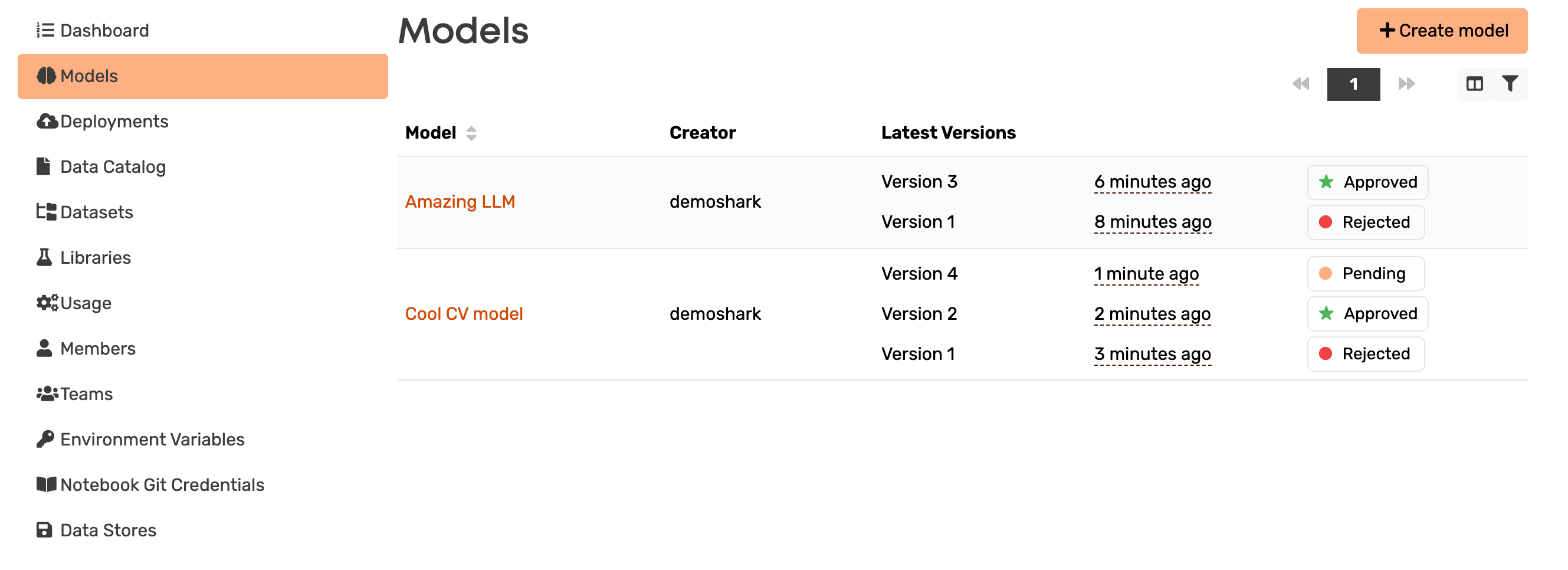
The Model Registry is a centralized hub for managing ML models' versioning and metadata. It provides a systematic way to track different versions of models along with details like their parameters, performance metrics, and approval status. You can for example:
* View all models and their versions in one place
* Manage model states (approved, pending, rejected) for seamless workflow management.
* Utilize single or multiple files to represent a “model”.
* Provide comprehensive descriptions, use cases, explanations, and deployment usage instructions.
* Trace the model creation process for transparency and reproducibility.
You can read more about the Model Registry in the Valohai documentation.
* [Introduction to the Model Registry](https://dokuhai.zendesk.com/hc/en-us/articles/25857315391121-Introduction-to-the-Valohai-Model-Registry)
* [Get started with the Model Registry](https://dokuhai.zendesk.com/hc/en-us/articles/25857290870161-Get-started-with-the-Valohai-Model-Registry)
#### Webhook triggers
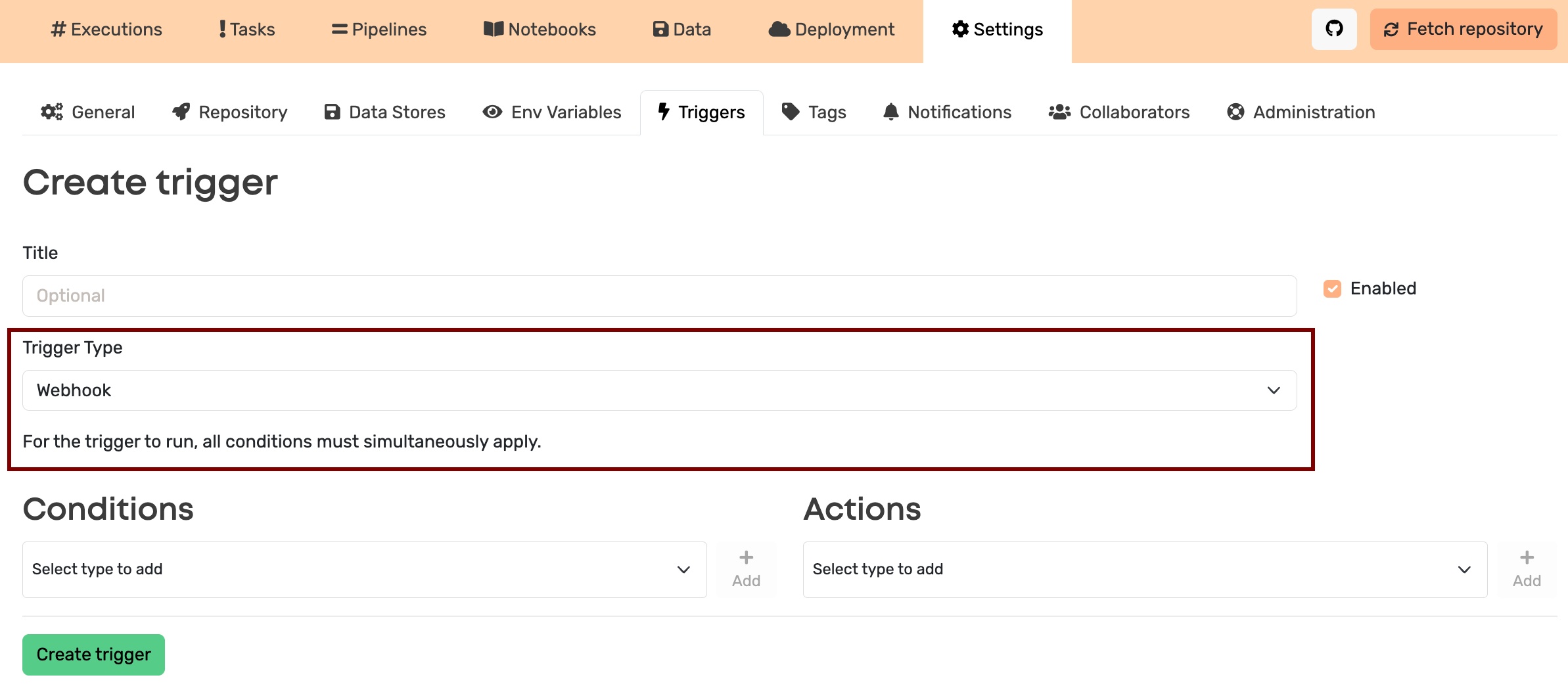
In addition to scheduled pipelines and executions, the Valohai triggers can now be used to launch pipelines on demand. Webhooks are web requests that many services and applications can send in response to events happening within. In other words, you can have your webhook-sending service sending a POST request to start a pipeline in Valohai. There are several methods for authenticating and verifying the requests.
To learn more about the topic, see the following articles in the Valohai documentation:
* [Introduction to webhook triggers](https://dokuhai.zendesk.com/hc/en-us/articles/24035968783505-Introduction-to-webhook-triggers)
* [Launch pipelines with webhooks](https://dokuhai.zendesk.com/hc/en-us/articles/24035968912401-Launch-pipelines-with-webhooks)
* [Trigger example with Slack](https://dokuhai.zendesk.com/hc/en-us/articles/24035969521809-Trigger-example-with-Slack)
* [Trigger example with GitHub](https://dokuhai.zendesk.com/hc/en-us/articles/24035969651729-Trigger-example-with-GitHub)
* [Trigger example with V7](https://dokuhai.zendesk.com/hc/en-us/articles/24035958780049-Trigger-example-with-V7)
* [Webhook triggers reference](https://dokuhai.zendesk.com/hc/en-us/articles/24035985165201-Webhook-triggers-reference)
#### Compare images side-by-side
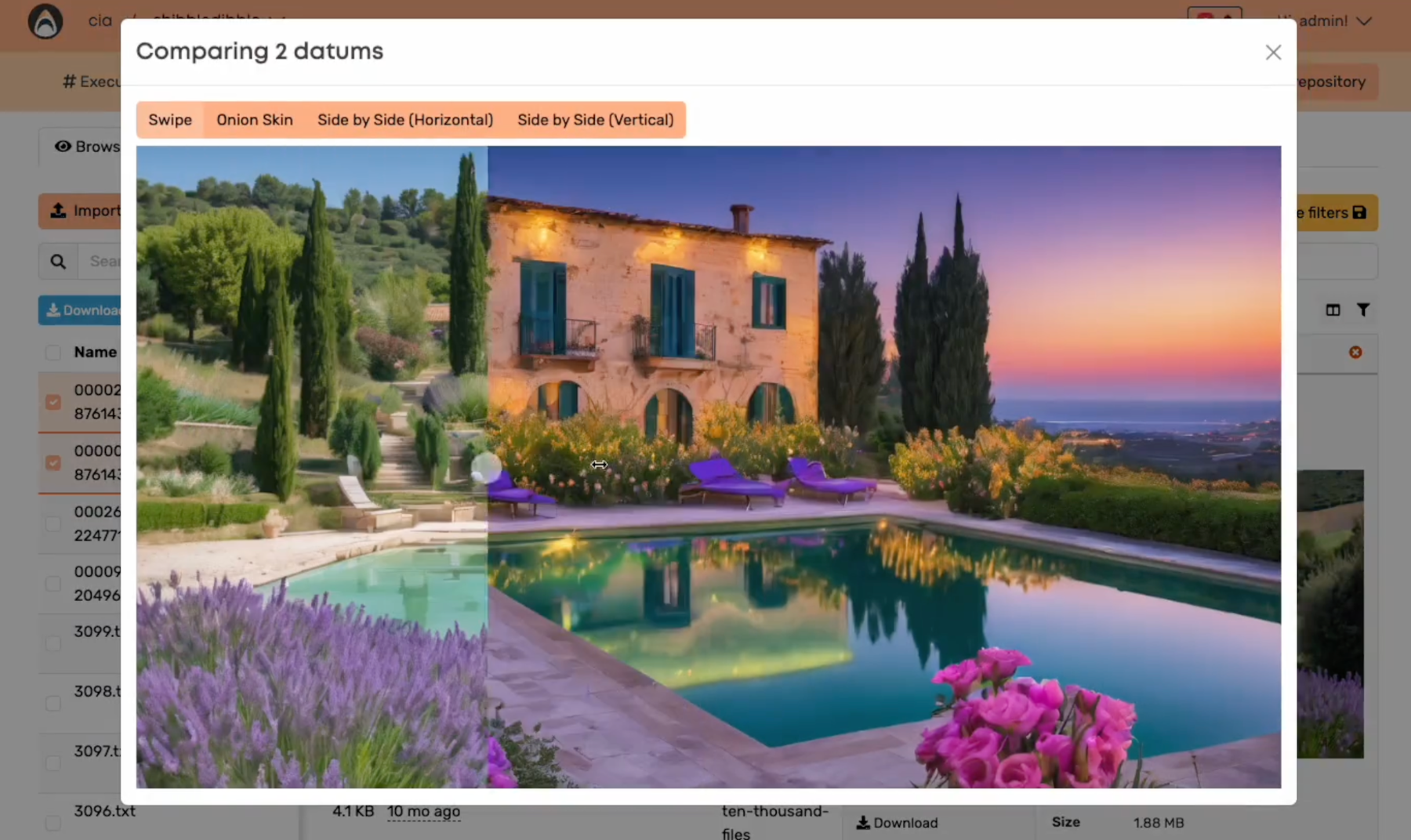
You can now compare image file outputs in the Valohai UI. To do this, choose two files under the outputs tab of a single job or under the Data tab of your project and click on the Compare button.
#### Multiple metadata charts
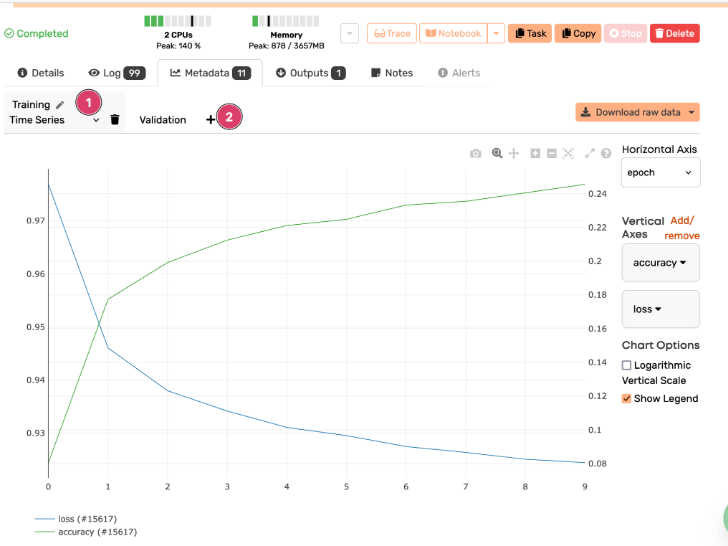
You can now add tabs for multiple plots under the Metadata section of your executions.
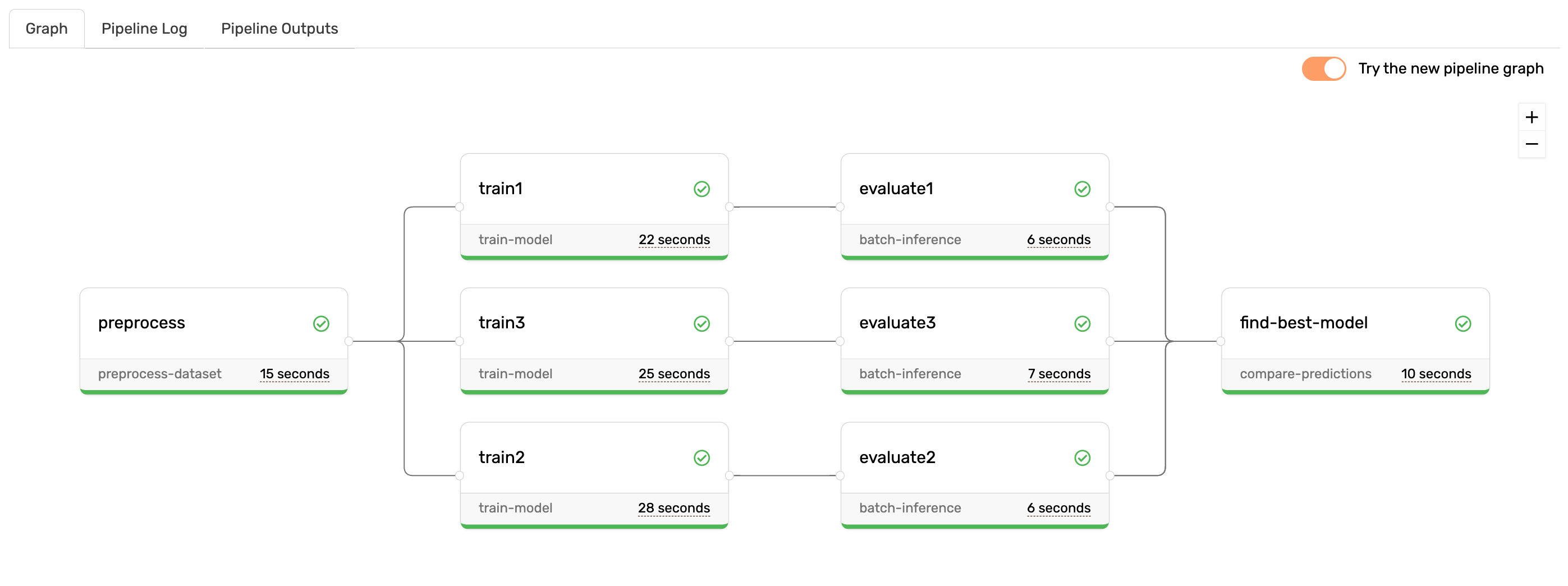
#### Opt-in for new pipeline experience
We have update the pipeline graph UI. You can choose to view either the classic graph or the new one by toggling the “Try the new pipeline graph” button.
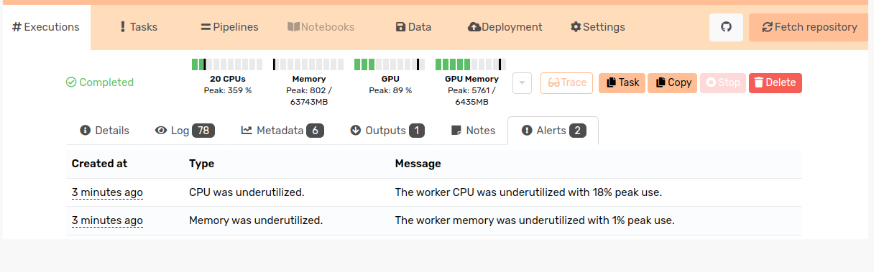
#### Execution underutilization alerts
Valohai records information about the resource usage for both CPU and GPU during your executions. You can now view alerts for resource underutilization under the execution Alerts tab. If the peak usage is under 50% of the maximum available capacity, you will get an alert. This can be used to optimize the compute resources for your executions.
#### Noteworthy changes
#### Pipeline edge behavior
If the step defining a pipeline node has a default value for an input, the files coming via an edge are appended to the default input(s) instead of replacing them. To overcome this, it has been possible to set a pipeline override and set the default input to be empty. In the future this behavior will change and the default input from the step definition will be replaced instead. You can still set the edge inputs to be appended to the default inputs if needed.
You can toggle this with the `edge-merge-mode` pipeline property
* `edge-merge-mode: replace` - replace input's default value when edge is overriding the input. If you do not define `edge-merge-mode` this will be used by default.
* `edge-merge-mode: append` - combine the input's default value with edge's output
### Environment list API
The environment list API will changed very slightly in a future release so **unfinished\_job\_count** is no longer included by default; it can be included with **?include=unfinished\_job\_count**.
### Inputs read-only
Valohai inputs have always been designed to be in a read-only directory. This will be further enforced in an upcoming peon change. Environments can be customized on a per-request basis to allow read/write access, due to some edge scenarios.
***
### Patch notes - 2024-03-11
## New features
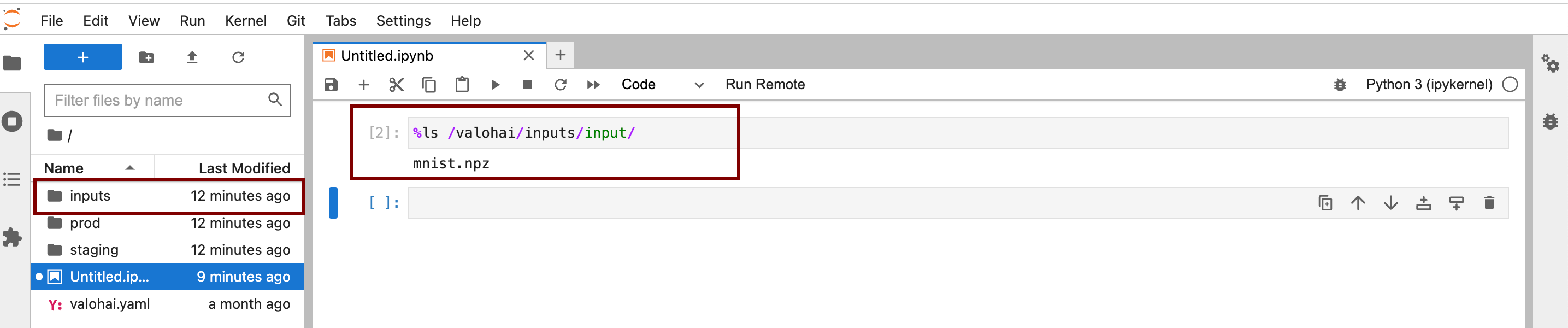
### Notebook inputs
The inputs you define for your notebook executions are now mounted in the working directory for easier access. In your code you can still access them from the familiar location: `/valohai/inputs/input/`
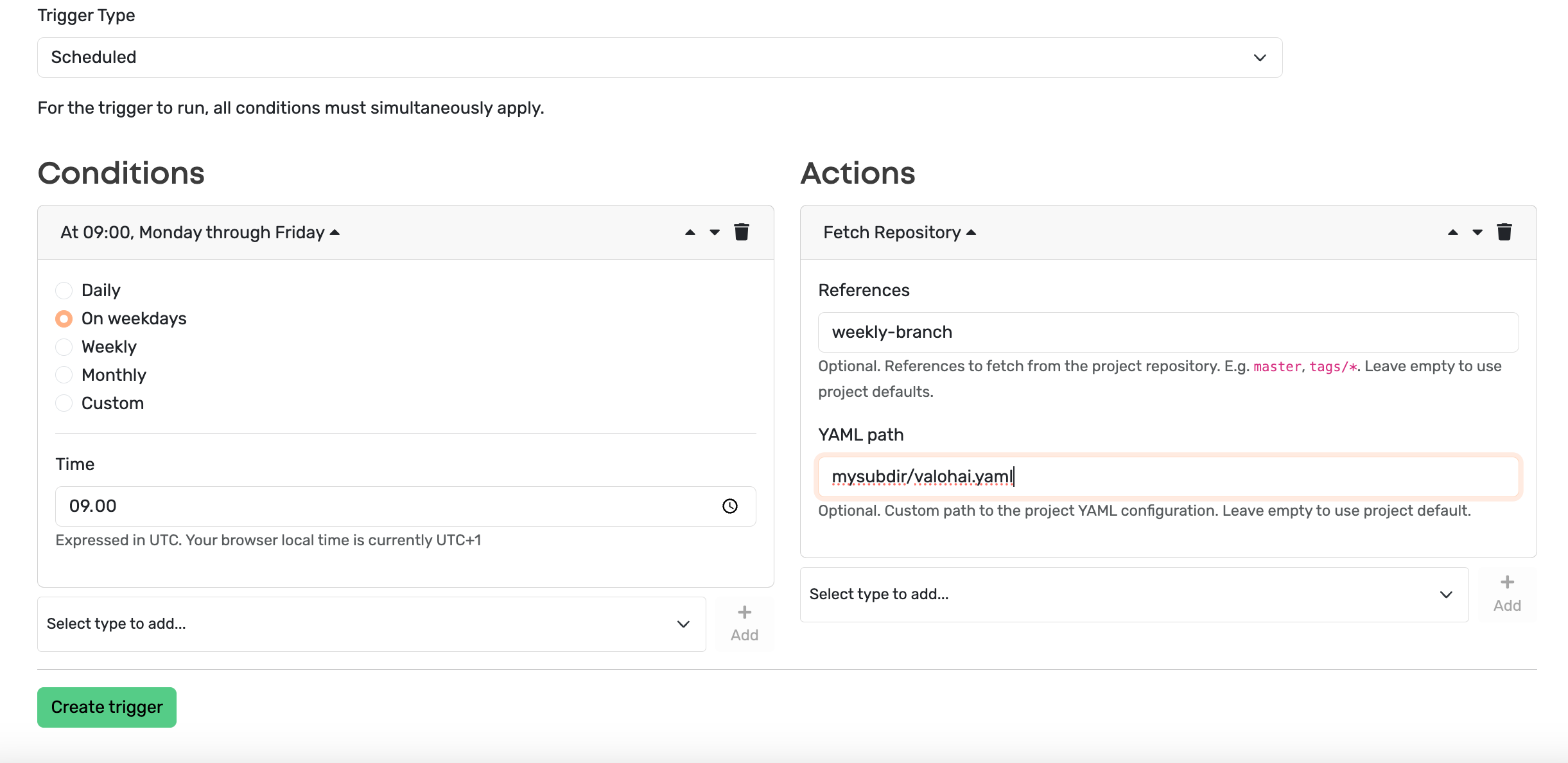
### Fetch repository trigger
You can now set triggers to fetch a repository automatically. The trigger will fetch the branches/tags defined in your project settings by default but you can also set it to fetch only specific ones. Moreover, you can also define a custom `valohai.yaml` path for the trigger instead of using the project default.
## Bug fixes
* Organization admins can now modify all organization data stores
* Watchdog messaging improved: Watchdog detects failed executions and does not kill the jobs.
***
### Patch notes - 2024-02-13
### New Features
#### Datum alias widget for Ecosystem database connectors
You can now define a datum alias in the UI for the output file from an execution ran with the Valohai Ecosystem database connectors. You can either choose to use an existing alias or create a new one.
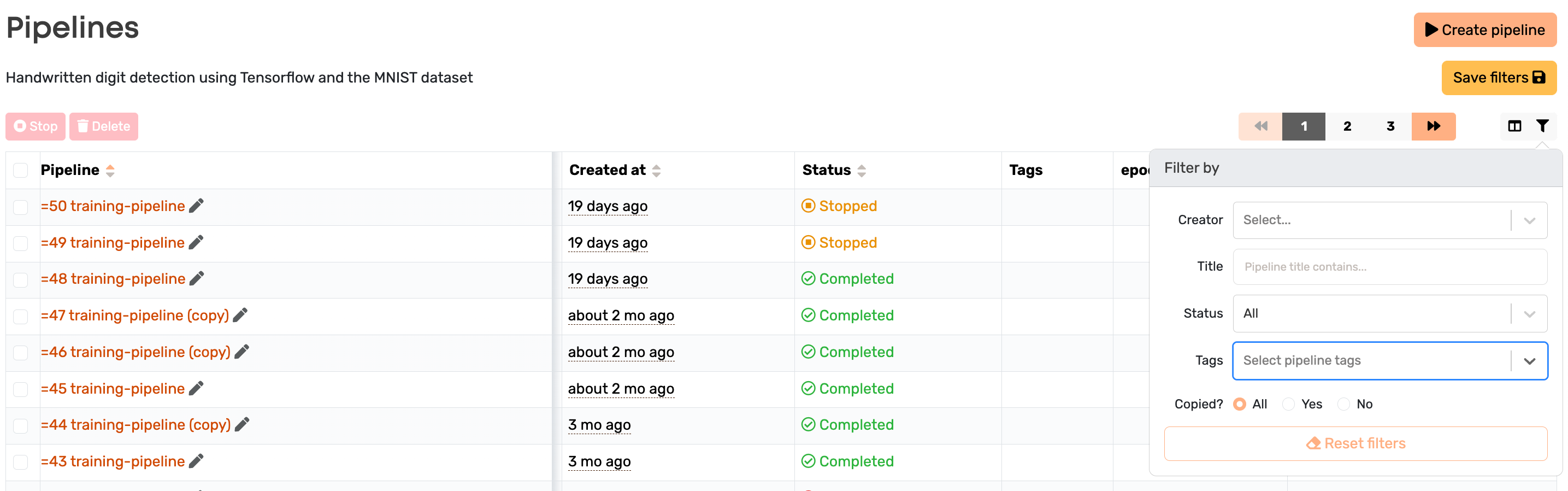
#### Filter pipelines by tags
It is now possible to filter pipelines based on tags. Note that these should be the pipeline and not the execution tags.
### SAML login improvements
If your organization wants to switch to using SAML login, it is now more convenient to connect the existing Valohai accounts with the new login.
### Bug fixes
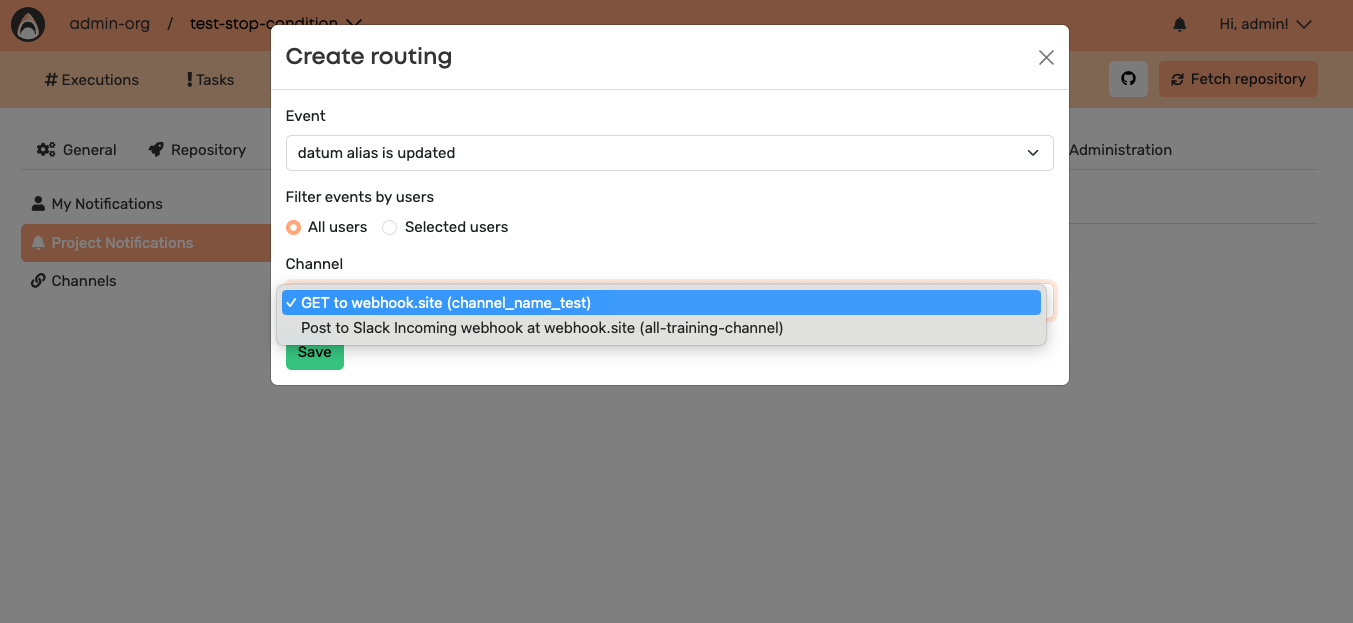
When creating routing for project notifications, the channel name is now shown in the Channel list instead of just a generic “GET to webhook.site”.
**Duplicate datum aliases**
There was a small winter bug going around in the datum alias section that caused some unwanted alias duplication. That has now been fixed and the aliases behave like expected again!
***
### Patch notes - 2024-01-29
### New features
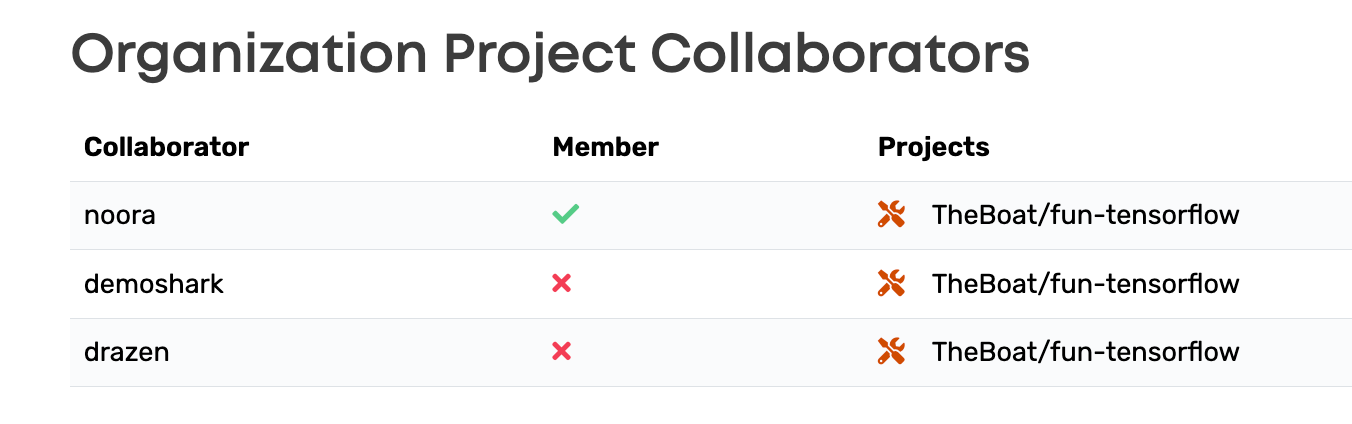
#### Organization collaborators
Organization admins can now inspect which users have been added as collaborators to the projects under the “Manage ” menu and the Collaborators section. You can manage the collaborators by clicking on the wrench icon.
In addition to the UI update there is also an API endpoint to get the project collaborators for the organization: [https://app.valohai.com/api/v0/organizations/{id}/collaborators/](https://app.valohai.com/api/v0/organizations/%7Bid%7D/collaborators/)
TIP: The ID is the organization ID. It contains four digits and you can get it from the URL when accessing the “Manage ” menu.
#### Deployment edges
It is now possible to create pipeline nodes after a deployment node. This can be used to for example check the endpoint once it has been created or clean old endpoints within the pipeline.
```yaml
- pipeline:
name: Post-deployment pipeline
nodes:
- name: deploy
type: deployment
deployment: my-deploy
endpoints:
- my-endpoint
- name: cleanup
type: execution
step: cleanup step
edges:
- [deploy.deployment.id, cleanup.parameters.deployment_id]
- [deploy.deployment.version_id, cleanup.parameters.version_id]
```
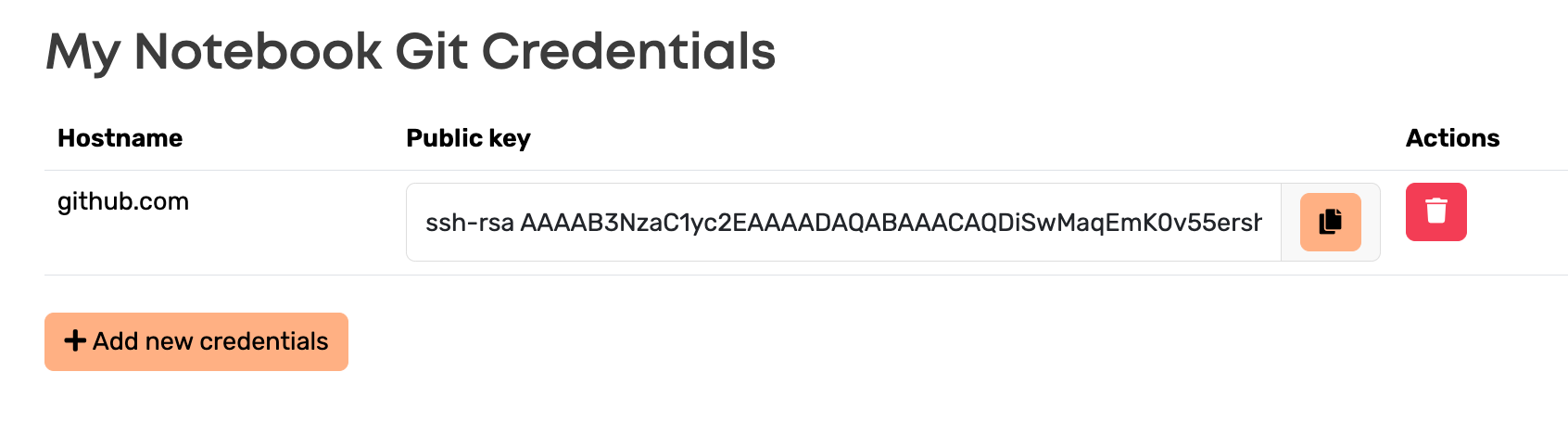
#### Add Notebook Git Credentials
Organization admins can now add Git credentials in order for users to access Git repositories from Notebook executions. You can do this under the “Manage ” menu \*\*\*\*and the “Notebook Git Credentials” section. Remember to add the public key to your repository (or repositories) to authorize the access!
### Bug fixes
* Collaborators can now access the project datum aliases.
* Keep-directories property in `valohai.yaml` now supports input interpolation, i.e. defining the input with a parameter `{parameter:input-url}`
***
---
# Agent Instructions
This documentation is published with GitBook. GitBook is the documentation platform designed so that both humans and AI agents can read, navigate, and reason over technical content effectively. Learn more at gitbook.com.
## Querying This Documentation
If you need additional information that is not directly available in this page, you can query the documentation by asking a question.
Perform an HTTP GET request on the following URL with the `ask` and `goal` query parameters:
```
GET https://docs.valohai.com/changelog/archive/updates-2024.md?ask=&goal=
```
`ask` is the immediate question: it should be specific, self-contained, and written in natural language.
`goal` is what the user is ultimately trying to achieve, the reason they need the answer. Sharing it helps GitBook give you a better, more relevant answer. A goal is most helpful when it describes the outcome the user wants rather than restating the question. For example, with `ask=how do I create an API token`, a goal like `automate deployments from our CI pipeline` lets GitBook tailor the answer to that use case.
The response will contain a direct answer to the question and relevant excerpts and sources from the documentation.
Use this mechanism when the answer is not explicitly present in the current page, you need clarification or additional context, or you want to retrieve related documentation sections.