# Installation & Setup

Valohai is a machine learning platform that runs on your infrastructure.

Valohai's architecture separates the application control plane from compute and data infrastructure. This guide covers the core components and deployment models for platform engineers setting up Valohai.

## Deployment Models <a href="#deployment-models" id="deployment-models"></a>

<table><thead><tr><th width="128.06640625">Model</th><th width="172.17578125">Application Layer</th><th width="179.69140625">Compute &#x26; Data Layer</th><th>Best For</th></tr></thead><tbody><tr><td><strong>Hybrid</strong></td><td>Valohai-managed (app.valohai.com)</td><td>Your infrastructure</td><td>Most teams. Teams who want managed platform updates and quick setup</td></tr><tr><td><strong>Self-Hosted</strong></td><td>Your infrastructure</td><td>Your infrastructure</td><td>Air-gapped environments, strict data residency, full control</td></tr></tbody></table>

### Hybrid Deployment

<figure><img src="https://4109720758-files.gitbook.io/~/files/v0/b/gitbook-x-prod.appspot.com/o/spaces%2Ff3mjTRQNkASbnMbJqzJ2%2Fuploads%2Fgit-blob-d36dbf8beb67553b503cf0aca37654fca66f5df3%2Fimage.png?alt=media" alt=""><figcaption></figcaption></figure>

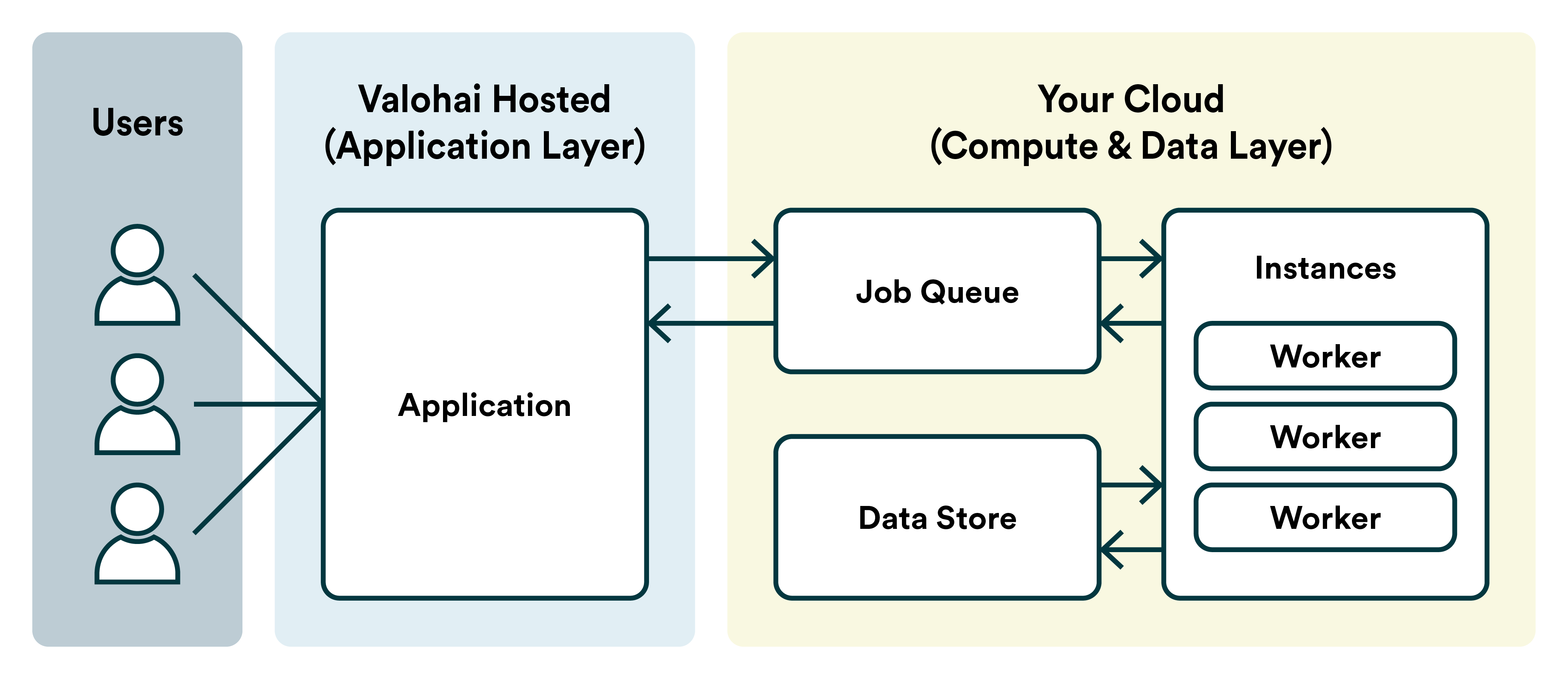
The application runs on Valohai's infrastructure while compute and data remain in your environment. This ensures your code, data, and models never leave your control.

**How it works:**

* Users access Valohai at `app.valohai.com`
* Valohai communicates with your Redis queue machine to schedule jobs
* Workers in your infrastructure pick up and execute jobs
* All training data and artifacts stay in your storage
* Only high-level job metadata flow to Valohai's database

**Requirements:**

* Compute environment
  * Cloud account (AWS, Azure, GCP, Scaleway, Oracle)
  * on-premises infrastructure
  * (optional, for K8s workers) Kubernetes cluster
* Network access from `app.valohai.com` to your queue machine
* Object storage (S3, Azure Blob, GCS, or S3-compatible)

### Self-Hosted Deployment <a href="#self-hosted-deployment" id="self-hosted-deployment"></a>

Both application and infrastructure run entirely within your environment. You control updates, access, and all network policies.

**How it works:**

* You host the Valohai application in your infrastructure
* Users access your instance at your domain
* All components communicate within your network
* Valohai provides application updates as Docker images

**Requirements:**

* Infrastructure for the application (bare metal, VM, or Kubernetes)
* PostgreSQL database
* Redis instance
* Object storage

## Components <a href="#components" id="components"></a>

<table><thead><tr><th width="173.1796875">Component</th><th width="194.94921875">Purpose</th><th>Specifications</th></tr></thead><tbody><tr><td><strong>Queue Machine</strong></td><td>Manages job scheduling and routing</td><td>• Static VM or managed Redis service<br>• 2 vCPUs, 4GB RAM minimum<br>• DNS name<br>• Runs Redis for job queue and short-term logs<br>• TLS certificate for secure communication</td></tr><tr><td><strong>Workers</strong></td><td>Execute ML workloads</td><td>• Pull jobs from queue machine<br>• Download inputs from object storage<br>• Run code in Docker containers<br>• Upload outputs to storage<br>• Scale down when idle</td></tr><tr><td><strong>Object Storage</strong></td><td>Stores artifacts, models, and logs</td><td>• Git repository snapshots<br>• Execution logs<br>• Input datasets<br>• Output artifacts (models, visualizations)</td></tr></tbody></table>

#### Worker Types <a href="#worker-types" id="worker-types"></a>

Valohai supports flexible worker infrastructure to match your environment:

<table><thead><tr><th width="174.984375">Type</th><th width="210.046875">Description</th><th>Use Case</th></tr></thead><tbody><tr><td><strong>Autoscaled VMs</strong></td><td>Cloud instances that scale based on demand</td><td>AWS, Azure, GCP, Scaleway, Oracle Cloud (OCI)</td></tr><tr><td><strong>Kubernetes Pods</strong></td><td>Containerized workers in K8s clusters</td><td>Cloud or on-premises Kubernetes</td></tr><tr><td><strong>Static Machines</strong></td><td>Physical or virtual machines</td><td>On-premises data centers, dedicated hardware</td></tr><tr><td><strong>SLURM Nodes</strong></td><td>HPC cluster integration</td><td>Existing SLURM-managed compute clusters</td></tr></tbody></table>

#### Supported Object Storage <a href="#supported-object-storage" id="supported-object-storage"></a>

* AWS S3
* Azure Blob Storage
* Google Cloud Storage
* Oracle Cloud Infrastructure (OCI) Object Storage
* S3-compatible storage (MinIO, NetApp, etc.)

## Networking & Security

#### Hybrid Deployment <a href="#hybrid-deployment-1" id="hybrid-deployment-1"></a>

<table><thead><tr><th width="168.66015625">Source</th><th width="157.53125">Destination</th><th width="86.78515625">Port</th><th>Purpose</th></tr></thead><tbody><tr><td><code>app.valohai.com</code> (34.248.245.191, 63.34.156.112)</td><td>Queue machine</td><td>63790</td><td>Job scheduling and queue management</td></tr><tr><td>Workers</td><td>Queue machine</td><td>63790</td><td>Pull jobs from Redis queue</td></tr><tr><td>Workers</td><td><code>app.valohai.com</code></td><td>443</td><td>Report status and metadata</td></tr><tr><td>Workers</td><td>Object storage</td><td>443</td><td>Download inputs, upload outputs</td></tr><tr><td>Workers</td><td>Internet</td><td>443</td><td>Pull Docker images and packages</td></tr><tr><td>Queue machine</td><td>Internet</td><td>80</td><td>Let's Encrypt certificate renewal (or use your own certificate)</td></tr></tbody></table>

**Security principles:**

* Code and data never leave your environment
* Workers never accept inbound connections from Valohai
* Only job metadata and logs are sent to Valohai's database
* All communication uses TLS encryption

#### Self-Hosted Deployment <a href="#self-hosted-deployment-1" id="self-hosted-deployment-1"></a>

<table><thead><tr><th width="151.00390625">Source</th><th width="152.0234375">Destination</th><th width="103.1640625">Port</th><th>Purpose</th></tr></thead><tbody><tr><td>Users</td><td>Valohai app</td><td>443</td><td>Web interface access</td></tr><tr><td>Valohai app</td><td>PostgreSQL</td><td>5432</td><td>Database queries (internal only)</td></tr><tr><td>Valohai app</td><td>Queue machine</td><td>63790</td><td>Job scheduling</td></tr><tr><td>Workers</td><td>Queue machine</td><td>63790</td><td>Pull jobs from Redis queue</td></tr><tr><td>Workers</td><td>Valohai app</td><td>443</td><td>Report status and metadata</td></tr><tr><td>Workers</td><td>Object storage</td><td>443</td><td>Download inputs, upload outputs</td></tr></tbody></table>

> 💡 *In self-hosted deployments, all network policies are under your control. The ports listed are defaults and can be customized during setup.*

## Choose Your Installation Path

### I have AWS

* **Hybrid**: [AWS Hybrid Deployment](https://docs.valohai.com/installation-and-setup/aws/hybrid)
* **Self-hosted on EC2**: [AWS Self-Hosted EC2](https://docs.valohai.com/installation-and-setup/aws/self-hosted-ec2)
* **Self-hosted on EKS**: [AWS Self-Hosted EKS](https://docs.valohai.com/installation-and-setup/aws/self-hosted-eks)

### I have Azure

* **Hybrid (Marketplace)**: [Azure Marketplace](https://docs.valohai.com/installation-and-setup/azure/marketplace)
* **Hybrid (Manual)**: [Azure Hybrid Deployment](https://docs.valohai.com/installation-and-setup/azure/hybrid)

### I have GCP

* **Hybrid**: [GCP Hybrid Deployment](https://docs.valohai.com/installation-and-setup/gcp/hybrid)

### I have Kubernetes

* **Workers on any K8s**: [Kubernetes Workers](https://docs.valohai.com/installation-and-setup/kubernetes/workers)
* **OVH Cloud**: [OVH Kubernetes](https://docs.valohai.com/installation-and-setup/kubernetes/ovh)
* **Oracle Cloud**: [Oracle Kubernetes](https://docs.valohai.com/installation-and-setup/kubernetes/oracle)

### I have on-premises servers

* **Linux workers**: [On-Premises Installation](https://docs.valohai.com/installation-and-setup/on-premises)

### I have OpenShift

* **Self-hosted**: [OpenShift Self-Hosted](https://docs.valohai.com/installation-and-setup/openshift/self-hosted)

### I have SLURM cluster

* **SLURM integration**: [SLURM Cluster](https://docs.valohai.com/installation-and-setup/index)

## What You'll Need

Every installation requires:

**From Valohai:**

* Queue address (e.g., `yourcompany.vqueue.net`)
  * You can also provision your own certificate
* Redis password (stored in your secret manager)
* For self-hosted: Docker images and license details

**From your environment:**

* Cloud account with appropriate permissions
* Object storage bucket
* Network connectivity between components
* For GPU workloads: GPU quota and drivers

**Before you start:**

* Review your organization's network and security policies
* Ensure you have necessary cloud permissions
* Decide on resource allocation (VM types, storage size)
* Plan your environment separation (dev/prod)

## Getting Help

Contact <support@valohai.com> if you:

* Need help choosing the right deployment model
* Have specific security or compliance requirements
* Want guidance on resource sizing
* Encounter issues during installation


---

# Agent Instructions: Querying This Documentation

If you need additional information that is not directly available in this page, you can query the documentation dynamically by asking a question.

Perform an HTTP GET request on the current page URL with the `ask` query parameter:

```
GET https://docs.valohai.com/installation-and-setup.md?ask=<question>
```

The question should be specific, self-contained, and written in natural language.
The response will contain a direct answer to the question and relevant excerpts and sources from the documentation.

Use this mechanism when the answer is not explicitly present in the current page, you need clarification or additional context, or you want to retrieve related documentation sections.
