> For the complete documentation index, see [llms.txt](https://docs.valohai.com/llms.txt). Markdown versions of documentation pages are available by appending `.md` to page URLs; this page is available as [Markdown](https://docs.valohai.com/executions/run-basic-execution.md).
# Run Basic Execution
Executions are Valohai's core compute unit, think of them as containerized ML jobs that run your code with specific parameters and inputs.
This guide shows you how to create and run executions using both the web interface and command line.
## What You Need
Before running an execution:
* A project with a `valohai.yaml` file containing at least one step
* Your code committed to the linked repository
* Sufficient compute quota in your organization
## Method 1: Web Interface
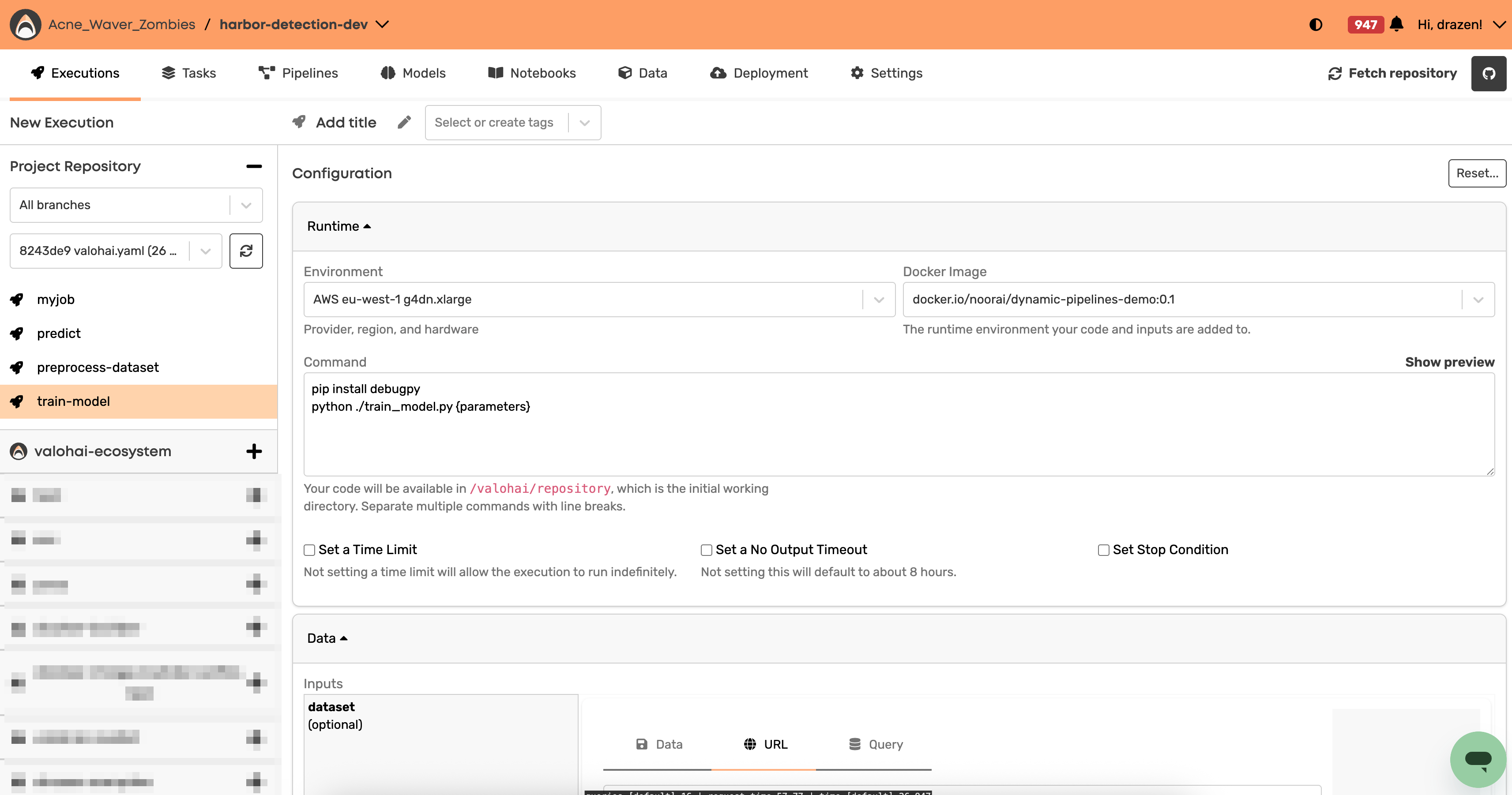
Navigate to your project and click **Create Execution**.
**Configure your execution:**
1. Select the step you want to run
2. Set parameters (or use defaults)
3. Add input files if your step requires them
4. Choose your compute environment
5. Click **Create Execution**
The execution will queue automatically and start when resources are available.
## Method 2: Command Line
### Basic Execution
Run a step with default settings:
```shell
vh exec run step-name
```
### With Parameters
Override the default parameter values:
```shell
vh exec run step-name --epochs 100 --learning-rate 0.001
```
### With Inputs
Override the default input files or datasets:
```shell
vh exec run step-name --dataset=https://example.com/data.zip
```
### Combined Example
```shell
vh exec run train-model \
--dataset=s3://my-bucket/training-data.zip \
--epochs 50 \
--batch-size 32
```
> 💡 *Use `vh exec run --help` to see all available options.*
### **Running local code with `--adhoc`:**
During development, you often want to test changes without committing to Git. Use the `--adhoc` flag to run your local code directly:
```shell
vh execution run --adhoc
```
This packages your local changes, uploads them to your data store, and downloads them on the worker for the execution. Everything stays fully reproducible, Valohai tracks the exact code snapshot used.
## Execution Lifecycle
Your execution moves through these states:
| State | Description |
| ------------ | --------------------------------------- |
| **created** | Waiting for quota or queuing |
| **queued** | Waiting for available compute resources |
| **started** | Currently running your code |
| **stopping** | Graceful shutdown in progress |
| **complete** | Finished successfully |
| **error** | Failed with an error |
| **stopped** | Manually cancelled |
Only the **started** state runs your actual code.
## Monitor Your Execution
### Real-time Logs
**Web UI:** Click on any running execution to view live logs.
**CLI:** Stream logs to your terminal:
```shell
vh exec logs --stream
```
**Get execution status:**
```shell
vh exec list --count 5
```
## Execution Environment
Each execution runs in an isolated container with:
* **Your code** at `/valohai/repository/` (working directory)
* **Input files** at `/valohai/inputs/{input-name}/`
* **Output directory** at `/valohai/outputs/` (write your results here)
* **Docker image** with your specified tools and libraries
## Common Issues
### Files Not Found
**Problem:** `FileNotFoundError: /valohai/inputs/data/file.csv`
**Solution:** Check your input paths. Inputs are directories, not files:
```python
# Wrong
data = pd.read_csv("/valohai/inputs/dataset.csv")
# Correct
data = pd.read_csv("/valohai/inputs/dataset/data.csv")
```
### Outputs Not Saved
**Problem:** Generated files don't appear in the web UI.
**Solutions:**
* Write files to `/valohai/outputs/` only
* Ensure files exist when your script completes
### Permission Errors
**Problem:** `PermissionError: [Errno 13] Permission denied`
**Solution:** Don't write to `/valohai/inputs/` it's read-only. Use `/valohai/outputs/` instead.
## Next Steps
* **Monitor progress** in the web UI or with `vh exec logs`
* **Download outputs** once execution completes
* **Compare results** across multiple executions
* **Scale up** by running multiple executions with different parameters
🎓 **Want a visual walkthrough?** [Complete Module 3 on Valohai Academy](https://learn.valohai.academy/training/629c55ce-5c77-11ee-b550-02e4e072a081/overview?certification_id=ac3f8064-5c29-11ee-8f31-06c8c79519b9)
---
# Agent Instructions
This documentation is published with GitBook. GitBook is the documentation platform designed so that both humans and AI agents can read, navigate, and reason over technical content effectively. Learn more at gitbook.com.
## Querying This Documentation
If you need additional information that is not directly available in this page, you can query the documentation by asking a question.
Perform an HTTP GET request on the following URL with the `ask` and `goal` query parameters:
```
GET https://docs.valohai.com/executions/run-basic-execution.md?ask=&goal=
```
`ask` is the immediate question: it should be specific, self-contained, and written in natural language.
`goal` is what the user is ultimately trying to achieve, the reason they need the answer. Sharing it helps GitBook give you a better, more relevant answer. A goal is most helpful when it describes the outcome the user wants rather than restating the question. For example, with `ask=how do I create an API token`, a goal like `automate deployments from our CI pipeline` lets GitBook tailor the answer to that use case.
The response will contain a direct answer to the question and relevant excerpts and sources from the documentation.
Use this mechanism when the answer is not explicitly present in the current page, you need clarification or additional context, or you want to retrieve related documentation sections.