# Add Context to Your Files

Your output files shouldn't exist in isolation. Attach experiment details, quality metrics, and production context directly to your files so your team can find, understand, and trust your data.

***

### The Problem

Without metadata, files become black boxes:

* Which experiment produced this model?
* What was the validation accuracy?
* Is this the production-ready version?
* What preprocessing was applied to this dataset?

Tracking this information in spreadsheets, wikis, or README files breaks down as projects scale. Valohai solves this by collecting experiment and lineage metadata automatically, and letting you attach additional context directly to files.

***

### Three Types of Metadata

Valohai supports three types of metadata, from simple to sophisticated:

#### 1. Tags — Simple Labels

Organize and filter files with text labels.

**Use for:** Categorization, status tracking, quick filtering

**Example:** `["validated", "production", "experiment-42"]`

**Learn more:** [Organize Files with Tags](/data/data-versioning/metadata-overview/tags.md)

***

#### 2. Aliases — Stable Pointers

Create human-readable shortcuts to specific files that can be updated over time.

**Use for:** Production references, "latest" pointers, team coordination

**Example:** `datum://model-prod` always points to current production model

**Learn more:** [Create File Shortcuts with Aliases](/data/data-versioning/metadata-overview/aliases.md)

***

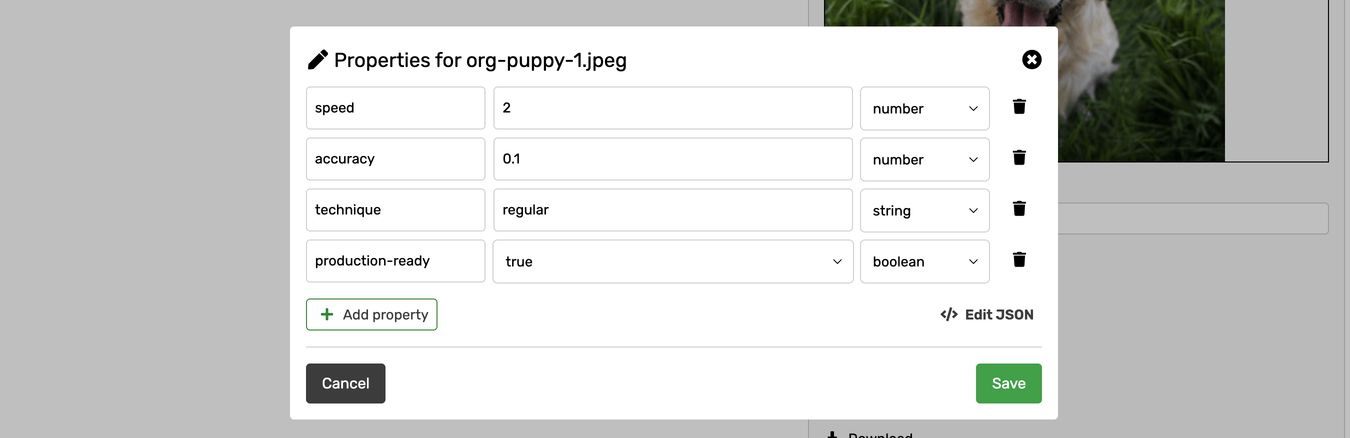
#### 3. Custom Properties — Rich Data

Store any structured data in JSON format.

**Use for:** Experiment tracking, quality metrics, production metadata

**Example:** `{"accuracy": 0.95, "factory": "EU", "stage": "release"}`

**Learn more:** [Track Custom Metadata](/data/data-versioning/metadata-overview/custom-properties.md)

***

### Quick Comparison

| Type           | Format                | Mutable               | Example Use Case                                 |
| -------------- | --------------------- | --------------------- | ------------------------------------------------ |
| **Tags**       | List of strings       | Yes                   | Mark files as "validated" or "production-ready"  |
| **Aliases**    | Single string pointer | Yes (pointer updates) | Point "model-prod" to latest approved model      |
| **Properties** | Any JSON              | Yes                   | Store `{"accuracy": 0.95, "hyperparams": {...}}` |

> :bulb: Tags and aliases are actually special property keys (`valohai.tags` and `valohai.alias`). You can combine all three in the same metadata file.

***

### How to Add Metadata

You have three options for adding metadata to your files. Choose based on when you want to add it and how many files you're processing.

#### Decision Tree

```
┌─ Saving 1-2 files?
│  └─→ Use sidecar files (.metadata.json)
│
┌─ Saving 3+ files?
│  └─→ Use single metadata file (valohai.metadata.jsonl) ← RECOMMENDED
│
└─ After execution completes?
   └─→ Use API
```

***

### Method 1: Sidecar Files (1-2 Files)

Save a `.metadata.json` file alongside each output file.

#### Naming Rules (Critical!)

The metadata file must have the **exact same name** as your output file, plus `.metadata.json`:

```
Correct:
model.pkl → model.pkl.metadata.json
data.csv → data.csv.metadata.json
results.json → results.json.metadata.json

Wrong:
model.pkl → model.metadata.json (missing .pkl)
model.pkl → metadata.json (missing full filename)
data.csv → data.csv.meta.json (wrong extension)
```

#### Python Example

```python
import json

# Your metadata (tags, alias, and custom properties)
metadata = {
    "valohai.tags": ["validated", "production"],
    "valohai.alias": "model-prod",
    "accuracy": 0.95,
    "epochs": 100,
}

# Save your output file
save_path = "/valohai/outputs/model.pkl"
model.save(save_path)

# Save metadata file
metadata_path = f"{save_path}.metadata.json"
with open(metadata_path, "w") as f:
    json.dump(metadata, f)
```

***

### Method 2: Single Metadata File (3+ Files) — RECOMMENDED

When processing many files, creating individual `.metadata.json` files is tedious. Use one `valohai.metadata.jsonl` file instead.

#### Why This Is Better

**Without JSONL (tedious):**

```
100 output files = 200 total files
/valohai/outputs/image_001.jpg
/valohai/outputs/image_001.jpg.metadata.json
/valohai/outputs/image_002.jpg
/valohai/outputs/image_002.jpg.metadata.json
... (98 more pairs)
```

**With JSONL (clean):**

```
100 output files = 101 total files
/valohai/outputs/image_001.jpg
/valohai/outputs/image_002.jpg
... (98 more images)
/valohai/outputs/valohai.metadata.jsonl  ← One file for all metadata
```

#### Format Requirements

**Filename:** Must be exactly `valohai.metadata.jsonl`

**Location:** `/valohai/outputs/valohai.metadata.jsonl`

**Format:** JSON Lines (JSONL) — one JSON object per line, newline-separated

Each line must have this structure:

```json
{"file": "output_filename.ext", "metadata": {"your": "property", "another_property": "value"}}
```

> ⚠️ **Important:** JSONL requires a newline (`\n`) after each JSON object. Missing newlines will cause parsing errors.

> ⚠️ If output file is not saved under `/valohai/inputs/file.txt` but instead under one or more subdirectories (e.g `/valohai/inputs/subdir/subdir_2/file.txt`) those have to be included in the value of `file` field inside `valohai.metadata.jsonl as well.`
>
> e.g. For such file: `/valohai/inputs/subdir/subdir_2/file.txt`\
> Value of `file` should be: `subdir/subdir_2/file.txt`

#### Python Example

```python
import json

# Process many files
for i in range(100):
    # Save output file
    image_path = f"/valohai/outputs/image_{i:03d}.jpg"
    processed_image.save(image_path)

# Create single metadata file for all outputs
metadata_path = "/valohai/outputs/valohai.metadata.jsonl"
with open(metadata_path, "w") as f:
    for i in range(100):
        metadata_entry = {
            "file": f"image_{i:03d}.jpg",
            "metadata": {
                "quality_score": scores[i],
                "processing_time": times[i],
                "valohai.tags": ["processed", "batch-2024-Q1"],
            },
        }
        json.dump(metadata_entry, f)
        f.write("\n")  # Critical: newline after each entry
```

> :bulb:The `metadata_entry` in the example above is not a single line like in the general example above. Why does this still work? In the example we are using `json.dump` which will actually produce just one line. Note that we are still adding the newline with `f.write("\n")` after each object as `json.dump` will not take care of that.

#### Common JSONL Mistakes

```python
# Wrong: Missing newlines
with open("/valohai/outputs/valohai.metadata.jsonl", "w") as f:
    json.dump({"file": "file1.jpg", "metadata": {...}}, f)
    json.dump({"file": "file2.jpg", "metadata": {...}}, f)  # No \n!

# Correct: Newline after each object
with open("/valohai/outputs/valohai.metadata.jsonl", "w") as f:
    json.dump({"file": "file1.jpg", "metadata": {...}}, f)
    f.write("\n")
    json.dump({"file": "file2.jpg", "metadata": {...}}, f)
    f.write("\n")
```

#### Helper Function

Create a reusable helper for your projects:

```python
import json


def save_metadata_jsonl(file_metadata_dict, output_dir="/valohai/outputs"):
    """
    Save metadata for multiple files in JSONL format.

    Args:
        file_metadata_dict: Dict mapping filenames to metadata dicts
                           e.g., {"model.pkl": {"accuracy": 0.95}}
    """
    metadata_path = f"{output_dir}/valohai.metadata.jsonl"
    with open(metadata_path, "w") as f:
        for filename, metadata in file_metadata_dict.items():
            json.dump({"file": filename, "metadata": metadata}, f)
            f.write("\n")


# Usage
file_metadata = {
    "model.pkl": {"accuracy": 0.95, "valohai.alias": "model-prod"},
    "data.csv": {"rows": 10000, "valohai.tags": ["validated"]},
    "results.json": {"experiments": 42},
}

save_metadata_jsonl(file_metadata)
```

#### With valohai-utils

The `valohai-utils` package provides built-in helpers:

```python
import valohai

with valohai.output_properties() as properties:
    for i in range(100):
        filename = f"image_{i:03d}.jpg"

        # Save output file
        image.save(valohai.outputs().path(filename))

        # Add metadata
        properties.add(
            file=filename,
            properties={
                "quality_score": scores[i],
                "valohai.tags": ["processed"],
            },
        )
```

***

### Method 3: API (After Execution)

Add or update metadata after execution completes using the Valohai API. Useful for validation workflows, quality gates, or manual approval steps.

#### Three API Endpoints

| Endpoint                           | Use When                           | What It Does                             |
| ---------------------------------- | ---------------------------------- | ---------------------------------------- |
| `/api/v0/data/{id}/metadata/`      | One file, one metadata set         | Apply properties to single datum         |
| `/api/v0/data/metadata/apply/`     | Multiple files, different metadata | Apply different properties to each datum |
| `/api/v0/data/metadata/apply-all/` | Multiple files, same metadata      | Apply same properties to all datums      |

#### Quick Example

```python
import os
import requests

properties = {
    "validation_score": 0.98,
    "approved_by": "data-team",
    "valohai.tags": ["validated"],
}

datum_id = "01234567-89ab-cdef-0123-456789abcdef"

response = requests.post(
    f"https://app.valohai.com/api/v0/data/{datum_id}/metadata/",
    json=properties,
    headers={
        "Authorization": "Token " + os.getenv("VH_TOKEN"),
        "Content-Type": "application/json",
    },
)
```

***

### Reserved Metadata Keys

Two keys have special meaning in Valohai:

<table><thead><tr><th width="212">Key</th><th>Type</th><th>Purpose</th><th>Details</th></tr></thead><tbody><tr><td><code>valohai.tags</code></td><td>List of strings</td><td>Creates tags</td><td><a href="/pages/S1DfzfaHc7Dp1PLy9Gn8">Tags page</a></td></tr><tr><td><code>valohai.alias</code></td><td>String</td><td>Creates/updates alias</td><td><a href="/pages/75EyiSXA7jVDVDHeT8bL">Aliases page</a></td></tr><tr><td><code>valohai.dataset-versions</code></td><td>List of dataset version URLs</td><td>Includes this datum in the dataset version</td><td><a href="/pages/o97BtcKKJn2uP561LTlG">Create dataset</a></td></tr><tr><td><code>valohai.model-versions</code></td><td>List of model version URLs</td><td>Includes this datum in the model version</td><td><a href="/pages/xbB2jVUkGLTFVxIhxAEC">Create and manage Models</a></td></tr></tbody></table>

All other keys are your custom properties.

#### Example Combining All Three

```python
metadata = {
    # Reserved Valohai keys
    "valohai.tags": ["validated", "production", "resnet50"],
    "valohai.alias": "model-prod",
    "valohai.dataset-versions": ["dataset://big-data/processed"],
    # Your custom properties
    "accuracy": 0.95,
    "precision": 0.93,
    "recall": 0.97,
    "epochs": 100,
    "learning_rate": 0.001,
    "dataset_version": "v2.3",
    "training_duration_minutes": 145,
    "experiment_id": "exp-042",
}
```

***

### Common Issues & Fixes

#### Metadata Not Appearing

**For sidecar files:**

* Wrong filename → Must be `output.ext.metadata.json` (exact match plus suffix)
* Not saved to `/valohai/outputs/` → Save in same directory as output
* Invalid JSON → Validate syntax (commas, quotes, brackets)

**For JSONL file:**

* Wrong filename → Must be exactly `valohai.metadata.jsonl`
* Missing newlines → Add `f.write('\n')` after each `json.dump()`
* Wrong structure → Each line must have `{"file": "...", "metadata": {...}}`

#### "Do I Need .metadata.json for Every File?"

**No!** This is the most common confusion. Here's the comparison:

**Sidecar approach (1-2 files):**

```python
# Good for small number of outputs
model.save("/valohai/outputs/model.pkl")
with open("/valohai/outputs/model.pkl.metadata.json", "w") as f:
    json.dump(metadata, f)
```

**JSONL approach (3+ files):**

```python
# Much better for many outputs
for i in range(100):
    image.save(f"/valohai/outputs/image_{i}.jpg")

# One metadata file for all 100 images
with open("/valohai/outputs/valohai.metadata.jsonl", "w") as f:
    for i in range(100):
        json.dump({"file": f"image_{i}.jpg", "metadata": {...}}, f)
        f.write("\n")
```

**Result:**

* Sidecar: 100 images = 200 files 😱
* JSONL: 100 images = 101 files 😊

***

### Next Steps

Now that you understand the metadata system, dive into specific use cases:

* [**Organize Files with Tags**](/data/data-versioning/metadata-overview/tags.md) — Label files for filtering and discovery
* [**Create File Shortcuts with Aliases**](/data/data-versioning/metadata-overview/aliases.md) — Set up production references and team coordination
* [**Track Custom Metadata**](/data/data-versioning/metadata-overview/custom-properties.md) — Store experiment results, quality metrics, and more

***

### Related Pages

* [Save Files](/data/data-versioning/save-files-from-jobs.md) — Save outputs that can have metadata
* [Versioning and Lineage](/data/data-versioning.md) — Track file dependencies
* [Load Data in Jobs](/data/data-versioning/load-files-in-jobs.md) — Use files with metadata as inputs


---

# Agent Instructions: Querying This Documentation

If you need additional information that is not directly available in this page, you can query the documentation dynamically by asking a question.

Perform an HTTP GET request on the current page URL with the `ask` query parameter:

```
GET https://docs.valohai.com/data/data-versioning/metadata-overview.md?ask=<question>
```

The question should be specific, self-contained, and written in natural language.
The response will contain a direct answer to the question and relevant excerpts and sources from the documentation.

Use this mechanism when the answer is not explicitly present in the current page, you need clarification or additional context, or you want to retrieve related documentation sections.